Download Kwai Videos Without Watermark in HD MP4, Plus the Audio and Thumbnail. Free, No App, No Login
Kwai is the international version of Kuaishou, big in Brazil, Latin America, and a growing list of other countries. Like every short-video app, it only lets you save clips with its logo and your username on them. This Kwai video downloader gives you the clean file instead: an MP4 without watermark, the audio on its own, or the thumbnail, all from your browser.
Nothing to install and no account to create. Copy the share link, paste it in the box above, and click Download. The same tool handles Kuaishou links and Snack Video links too.
How to Download Kwai Videos Step by Step
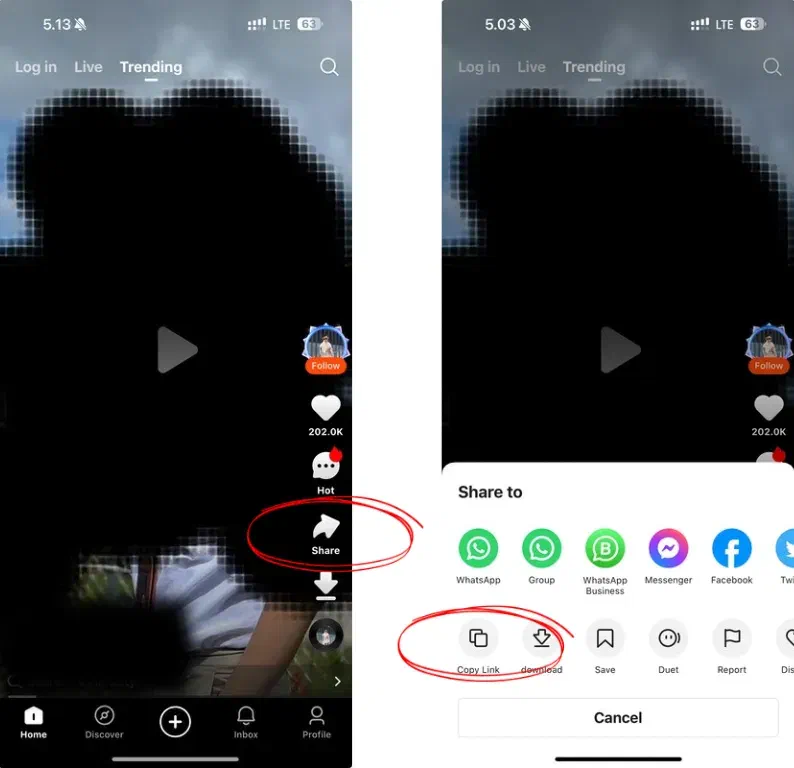
Open the video in the Kwai app and tap Share.
Choose Copy Link. The link looks like https://k.kwai.com/p/XXXXXXXX.
Paste it into the box at the top of this page and click Download.
Wait a few seconds for the four buttons to appear.
Pick Download Without Watermark, the [HD] version, Download Music MP3, or Download Thumbnail.
Download Without Watermark: the MP4 Kwai serves to its player, no logo, no username. Our test clip was 720 × 1280 pixels.
Download Without Watermark [HD]: the highest resolution Kwai has for that video. If Kwai only stores one version, this is the same file as the first button.
Download Music MP3: the audio track alone, saved as an M4A (AAC) file.
Download Thumbnail: the cover image as a WebP file.
Top Features of the Online Kwai Downloader
Whether you want a clip for offline viewing, a sound for your own video, or a cover image, one paste covers it.
Original Quality, No Re-encoding
You get the file Kwai serves, with its original resolution, frame rate, and sound. Nothing is compressed again on the way to you.
Watermark-Free Downloads
No Kwai logo and no username overlay. The video is ready for editing or re-sharing with credit to the creator.
Works on Any Device
Android, iPhone, iPad, Windows, Mac: any browser works, with no app, APK, or extension to install.
Is It Safe to Use a Tool to Download Kwai Videos?
Yes. You don't log in or share any personal information, and we don't keep the videos or your download history. The link is processed on the spot and the file goes straight to your browser. Private accounts stay private: the tool only works with videos that are public on Kwai.
If a download fails, copy the link again from the Share button, make sure the video still opens in the Kwai app, and try outside the in-app browsers of Facebook, Instagram, or WhatsApp, which often block downloads. Videos belong to their creators, so keep downloads for personal use or ask before re-uploading; see the Copyright page.
Frequently Asked Questions
Is it free?
Yes. No fee, no subscription, no download limit. The site is supported by ads.
Which Kwai links work?
The link from Share → Copy Link in the Kwai app, which looks like https://k.kwai.com/p/XXXXXXXX. Other links on the kwai.com domain are accepted too.
Do I need a Kwai account?
No. The share link is enough, and dvSnackVideo has no login of its own.
Can I save only the audio?
Yes. Download Music MP3 saves the soundtrack as an M4A (AAC) audio file that plays on any phone or computer.
Does it remove the watermark?
Yes. The Download Without Watermark button gives you the MP4 Kwai serves to its own player, with no Kwai logo or username on it. We checked our test clip at the start, middle, and end.
What does the [HD] button do?
It fetches the highest resolution Kwai provides for that video. When Kwai only has one version, both buttons give the same file; our 720 × 1280 test clip was like that.
Can I download the Kwai thumbnail?
Yes. Download Thumbnail saves the cover image as a WebP file at the size Kwai provides.
Where is the downloaded file saved?
Android: the Download folder. iPhone: Safari’s Downloads list, then the Files app; use Save Video to move it to Photos. PC and Mac: your browser’s Downloads folder.
Can I download private or restricted videos?
No. The video has to be public and open from its share link. Private, deleted, or restricted videos return an error.
Is Kwai the same as Kuaishou and Snack Video?
They are three versions of one app from Kuaishou Technology: Kuaishou for mainland China, Kwai for Brazil, Latin America, and other international markets, and Snack Video for South and Southeast Asia. dvSnackVideo accepts links from all three.
Fetching your video…
This usually takes just a few seconds.
We use cookies to analyze traffic and improve your experience. You can accept or reject analytics cookies.
Privacy Policy